

If your internet feels slow, video calls start lagging, or cloud applications take longer to respond, the issue isn’t always poor connectivity. In many cases, it’s network congestion.
I’ve seen how confusing this can be; everything appears operational, yet performance steadily declines. That’s why I’m writing this: to clearly explain what network congestion is, why it occurs, and how it impacts real-world network performance.
Network congestion happens when data traffic exceeds available bandwidth or processing capacity. As demand outpaces capacity, latency rises, packets may be dropped, and application performance begins to degrade. In today’s cloud-driven and hybrid environments, even minor congestion can disrupt critical operations.
In enterprise environments, network congestion rarely happens suddenly. It typically develops as traffic volumes grow, cloud adoption increases, and capacity planning fails to keep pace with business demand. Without continuous performance visibility, congestion often goes unnoticed until user experience begins to degrade.
What Is Network Congestion?
Network congestion is a network condition that occurs when the volume of data traffic exceeds the available bandwidth or processing capacity at a specific point in the infrastructure. When demand surpasses what the network can handle, data packets begin to queue before transmission.
As defined in the IETF’s congestion control principles, congestion occurs when network resources are overutilized, leading to degraded performance and packet loss. This technical foundation helps clarify what is network congestion beyond just “slow internet” and frames it as a measurable capacity imbalance.
As queues grow and capacity limits are reached, latency increases, and packet loss may occur. This directly affects application responsiveness, real-time communication, and overall network stability, particularly in environments with high traffic or limited link capacity.
How Network Congestion Occurs?
Network congestion occurs when multiple devices and applications send data across the network at the same time, exceeding the available bandwidth. As traffic increases, network devices such as routers and switches begin to queue packets before forwarding them.
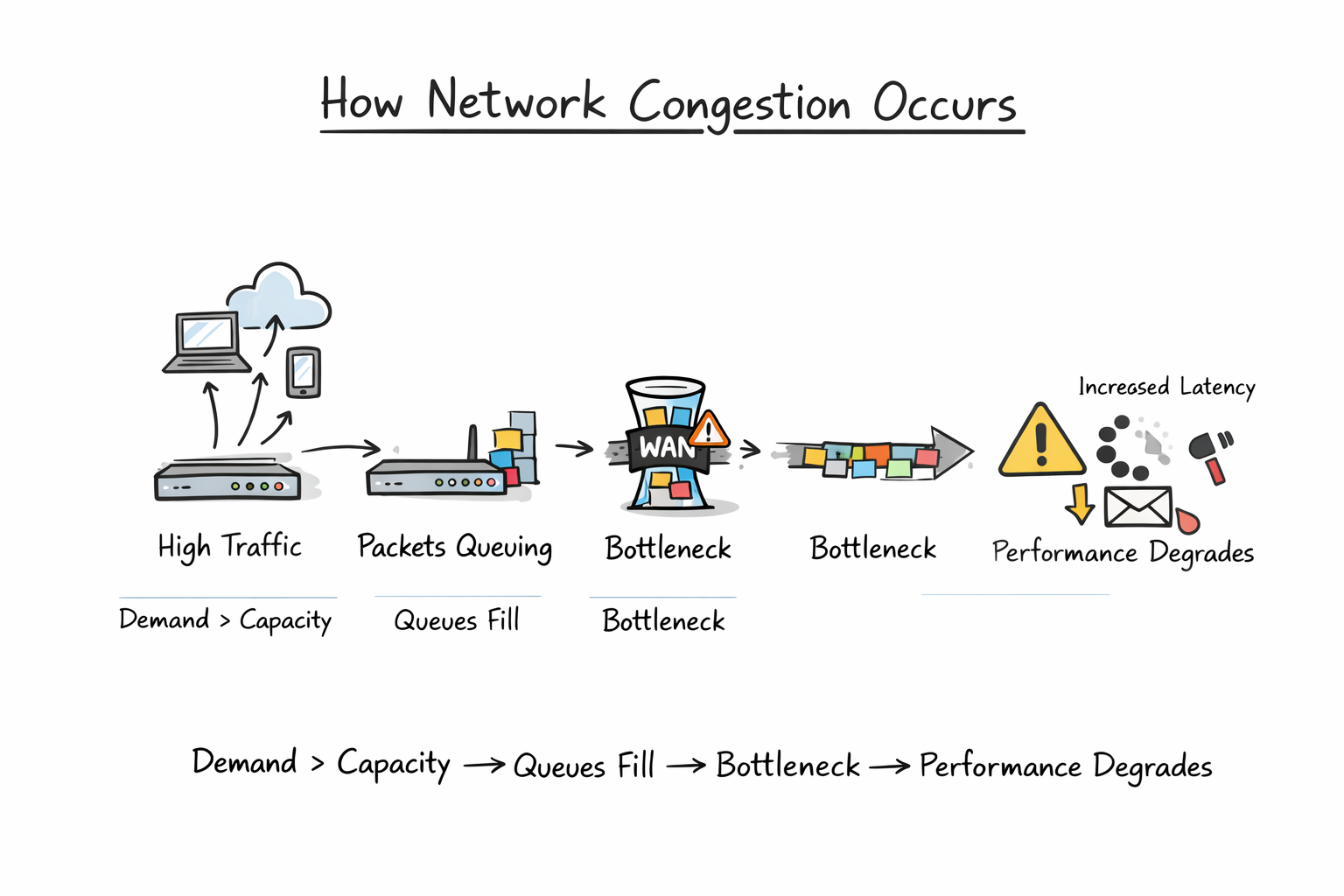
When traffic continues to grow beyond processing or link capacity, queues fill up. This results in higher latency, packet drops, and retransmissions, which further increase network load. Congestion typically builds at bottlenecks, such as limited WAN links, oversubscribed uplinks, or heavily used cloud connections, where demand consistently exceeds capacity.
Common Causes of Network Congestion
Network congestion typically occurs when traffic demand grows faster than available capacity or when traffic is not properly managed. In most environments, congestion is not caused by a single issue but by a combination of factors.
Common causes include:
Insufficient bandwidth on WAN, internet, or inter-site links
Peak usage spikes where multiple users or systems generate high traffic simultaneously
Lack of traffic prioritization (QoS) for business-critical applications
Large data transfers such as backups, updates, or bulk file synchronization
Rapid growth in cloud and SaaS usage without corresponding network scaling
Hardware limitations on routers, switches, or firewalls reaching throughput limits
Misconfigured routing or inefficient traffic paths
In enterprise networks, congestion often develops gradually as demand increases and capacity planning does not keep pace with growth.
Signs and Symptoms of Network Congestion
Network congestion usually appears as gradual performance degradation rather than a total outage. Common signs include:
Increased latency and delayed application responses
Buffering, lag, or frozen screens during video calls
Packet loss leading to retries or incomplete data transfers
Jitter affecting voice and real-time collaboration tools
Slower file uploads and downloads despite stable connectivity
Inconsistent performance across cloud or SaaS applications
High and sustained bandwidth utilization on specific links
Growing interface queues or spikes in retransmissions
When these symptoms persist, it often indicates that traffic demand is exceeding available network capacity at one or more bottlenecks.
How Network Congestion Impacts Performance
Network congestion directly affects application speed, reliability, and user experience. As traffic demand exceeds available capacity, latency increases, and packets may be dropped, forcing retransmissions that further slow communication.
For end users, this results in slower application response times, buffering during video meetings, and unstable voice calls. For IT teams, congestion can make systems appear unreliable even when the infrastructure is technically operational.
Over time, sustained congestion reduces overall network efficiency, increases troubleshooting complexity, and impacts productivity, particularly in cloud-driven and hybrid environments where consistent performance is critical.
How to Diagnose Network Congestion
Diagnosing network congestion requires structured analysis of traffic behavior and capacity limits across the infrastructure. The first step is identifying links, devices, or segments showing sustained high utilization, especially during predictable peak periods.
Using reliable network monitoring software enables teams to track bandwidth consumption, latency trends, packet loss, and retransmission patterns in real time, making it easier to detect bottlenecks before users report issues.
Focus on three primary performance indicators:
Capacity Metrics – Interface utilization, bandwidth consumption, and throughput levels
Quality Metrics – Latency, packet loss, and jitter
Efficiency Metrics – Retransmission rates and interface queue growth
Consistent saturation of links above acceptable thresholds, combined with rising latency or packet loss, typically confirms congestion at a specific bottleneck.
Comparing real-time performance against historical baselines helps determine whether the issue is a temporary traffic surge or an ongoing capacity constraint. Effective diagnosis depends on continuous monitoring and trend visibility rather than reactive troubleshooting after user complaints.
How to Fix Network Congestion
Fixing network congestion starts with identifying the bottleneck. Once the constrained link, device, or segment is confirmed, corrective actions should focus on restoring balance between demand and available capacity.
Common approaches include:
Increasing bandwidth on saturated WAN or internet links
Upgrading network hardware that has reached throughput limits
Implementing Quality of Service (QoS) policies to prioritize critical traffic
Redistributing traffic across multiple links using load balancing
Optimizing or limiting non-essential background traffic
Rescheduling large data transfers outside peak usage hours
In some cases, congestion may be caused by inefficient routing or misconfigured policies. Reviewing network design and traffic flow can reveal structural issues that require architectural adjustments rather than simple upgrades.
In many environments, long-term stability also depends on implementing traffic prioritization policies. By classifying business-critical, real-time, and background traffic separately, organizations can ensure essential applications maintain performance even during peak load conditions.
The goal is not just to add capacity, but to ensure traffic is efficiently managed and aligned with business priorities.
How to Prevent Future Congestion Issues
Preventing network congestion requires proactive capacity planning and continuous visibility into traffic patterns. Instead of reacting to performance complaints, organizations should monitor bandwidth utilization trends and identify growth patterns early.
Key preventive measures include:
Regularly analyzing traffic baselines to detect rising demand
Implementing Quality of Service (QoS) policies to protect critical applications
Designing networks with scalable bandwidth and redundant links
Segmenting traffic to reduce unnecessary broadcast or cross-network load
Continuously monitoring latency, utilization, and packet loss metrics
By aligning network capacity with business growth and application demands, congestion can be anticipated and mitigated before it impacts performance.
Conclusion
Network congestion is not a system failure, it is a capacity imbalance that occurs when traffic demand exceeds what the network can efficiently handle. Left unmanaged, it leads to increased latency, packet loss, unstable applications, and reduced productivity.
Understanding how congestion forms, identifying early warning indicators, and analyzing performance trends are essential for maintaining reliable network operations. In modern cloud-driven and hybrid environments, congestion is often a predictable outcome of growth rather than an isolated event.
Sustained network stability depends on proactive monitoring, capacity planning, and intelligent traffic management. With continuous visibility into performance metrics, congestion can be anticipated and controlled before it impacts critical systems.
Frequently Asked Questions
What causes network congestion?
Network congestion is typically caused by traffic demand exceeding available bandwidth. This can result from high user activity, large data transfers, limited WAN capacity, misconfigured network policies, or unexpected traffic spikes.
Is network congestion the same as slow internet?
No. Slow internet can be caused by several factors, including ISP limitations or hardware issues. Network congestion specifically refers to traffic overload within a network segment that leads to delays and packet loss.
Can network congestion cause packet loss?
Yes. When queues fill up at routers or switches, packets may be dropped. This leads to retransmissions, increased latency, and reduced overall network efficiency.
How do I know if congestion is affecting my network?
Common indicators include sustained high bandwidth utilization, increased latency, packet loss, jitter in real-time applications, and inconsistent cloud performance.
Can network congestion be prevented?
While traffic spikes cannot always be avoided, congestion can be minimized through capacity planning, traffic prioritization, scalable design, and continuous network performance monitoring.